




The plan
Every paycheck starts here.
On payday you open the Plan tab and give each envelope its share, so by the time you spend anything, you know what every dollar is for.
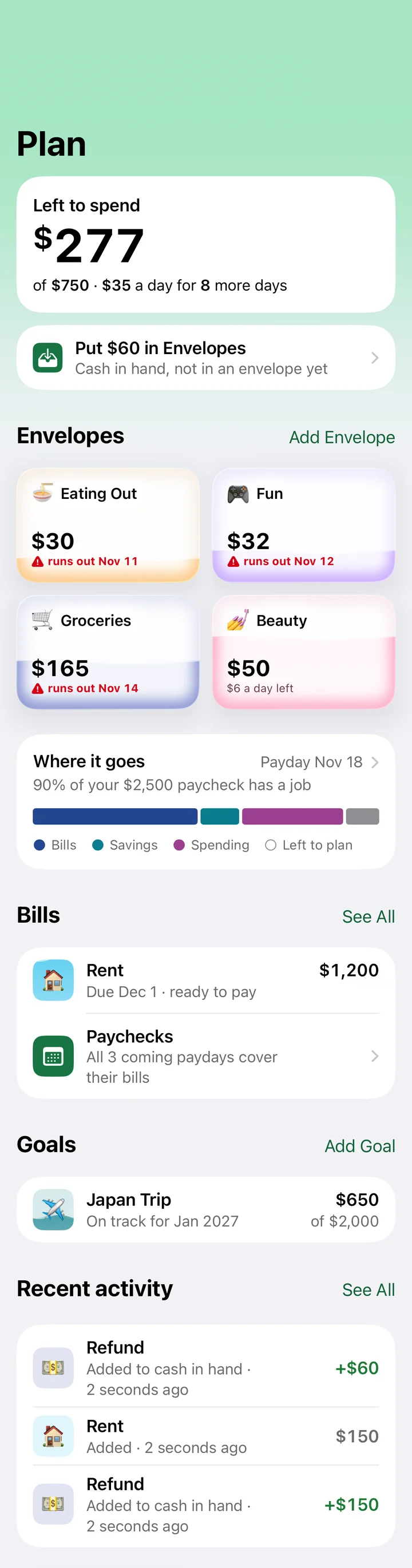
Left to spend
The top number is yours to spend.
Your bills were set aside on payday, so none of this $277 is spoken for. Larder spreads it over the days until your next payday, which works out to $35 a day for 8 more days.
Envelopes
Some envelopes won’t make it to payday.
At the rate you’re spending, Eating Out will be empty on Nov 11, and you can see that while there’s still $30 in it. Any envelope headed for zero before payday gets a date like this.
Where it goes
Most of it already has a place.
90% of this $2,500 is split between bills, savings and the envelopes you spend from.
Bills and goals
Rent is covered, and the trip is still on track.
The $1,200 rent due Dec 1 is sitting in its envelope, and the Japan Trip has $650 of its $2,000, enough to stay on track for Jan 2027.
Trends
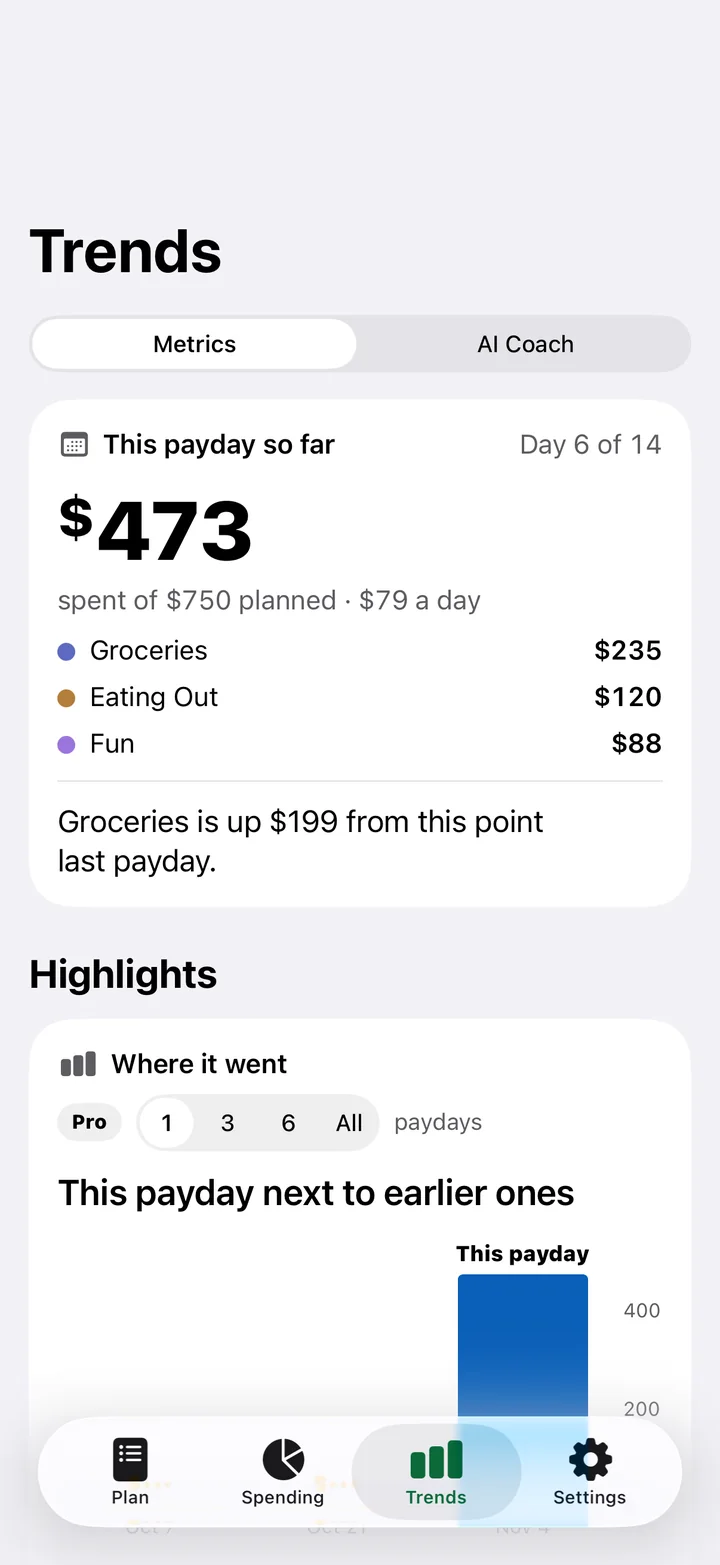
How does this payday compare with the last one?
Trends lines up the same stretch of both, which is how you find out groceries are up $199 from this point last payday.
Share
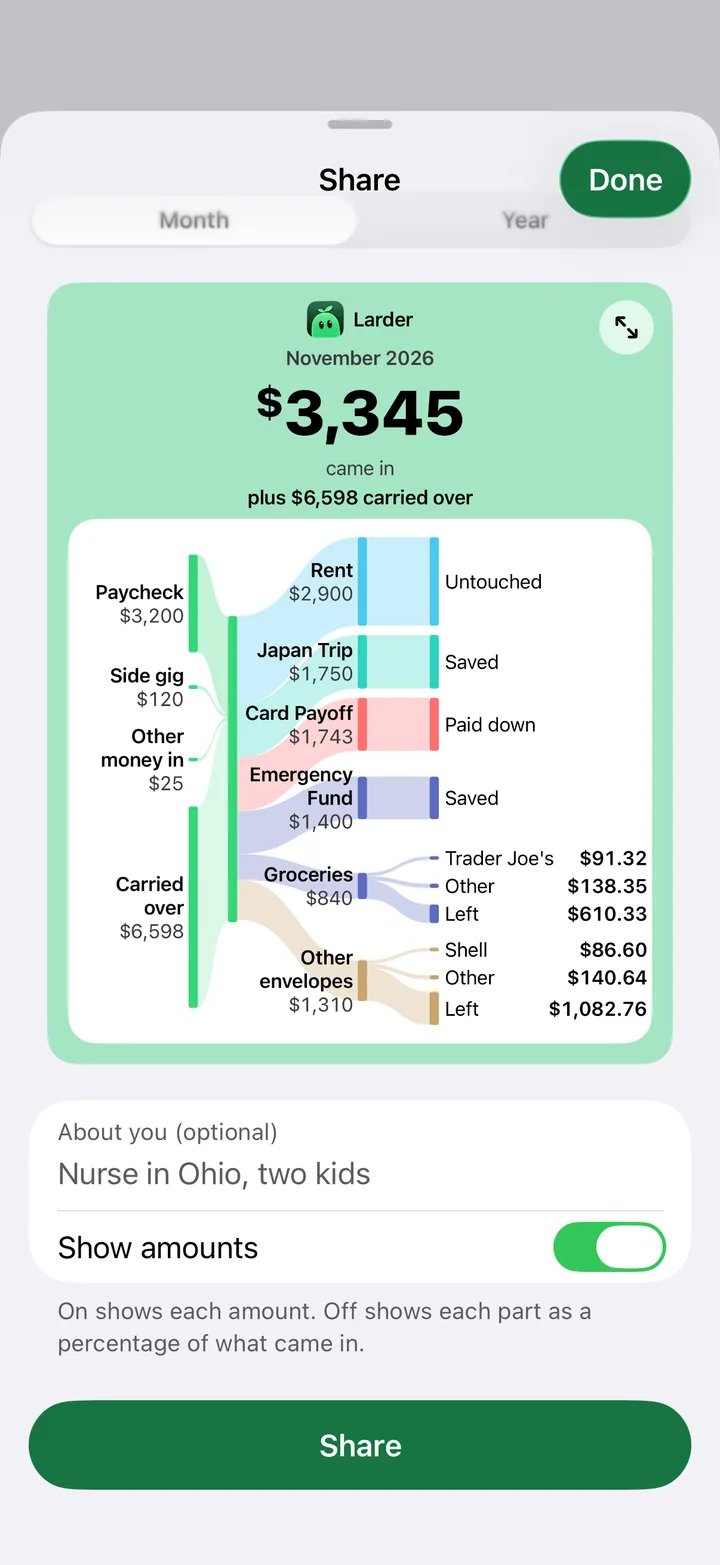
The whole month fits in one picture.
It shows what came in and which envelope each dollar went to, and you can share it with the amounts showing or switch them to percentages first.
A few things you can check before downloading anything
26
paychecks come in a biweekly year, two more than twice-a-month pay
$5,050
is what the 100-envelope challenge adds up to
That’s $1 in the first envelope, $2 in the next, and so on up to $100. Track it
What a printable leaves out
8 bills 26 bills
If you take $347 out in one lump, that’s eight bills. Split it across five envelopes that each have to come out exact and you need twenty-six, which is the count you can’t get from a printable.
Work out the bills- $100 bills
- 1
- $50 bills
- 3
- $20 bills
- 2
- $10 bills
- 3
- $5 bills
- 2
- $1 bills
- 15

Privacy
Larder never asks for your bank login.
There’s no bank-data service behind it, so you type in what you spend or import Apple Card on your own iPhone.
Try the math first
These five calculators run the same math the app does, in your browser and without an account, and nothing you type into them is saved.
- 01Biweekly budget calculatorSplit your take-home pay between bills and envelopes across a 26-paycheck year.
- 02Savings challenge trackerTrack the 100-envelope or 52-week challenge, or a goal you set yourself.
- 03Paychecks left this yearCount the paydays left this year and see which months get an extra one.
- 04Sinking fund categoriesWork out what to save each payday for costs that don’t come monthly, most urgent first.
- 05Cash envelope plannerSplit cash by category and get the exact bills to withdraw.
How this kind of budgeting works
These guides answer what people search for when they start budgeting by paycheck.
- How many paychecks are in a year by pay schedule?
- How to budget by paycheck
- What is envelope budgeting?
- What is a sinking fund?
- What to do with a third paycheck month
- Cash envelope categories: a practical starter list
- Emergency fund vs. sinking fund: which comes first?
- What to do when an envelope runs out
- Should you budget weekly or per paycheck?
- How much should I save per paycheck?
- How to budget when you get paid biweekly
- How to budget when you get paid weekly
- How to budget when you get paid once a month
- How to budget when you get paid twice a month
- What is cash stuffing?
- What is a zero-based budget?
- Can you budget without linking your bank account?
- How to log Apple Pay purchases in a budget automatically

Start with your next paycheck
You set the envelopes up once, and every payday after that starts from the plan you already made.
Get LarderGet Larder on the App StoreIt’s free to use and works offline, and Pro is there if you want it.