The app
A paycheck budget app for iPhone: how Larder works
Larder is a paycheck budget app for iPhone. On payday you split the paycheck into envelopes for bills, spending, saving and debt, and from then on the app shows one number: what is left to spend until your next payday, and what that comes to per day. It plans around the day you are paid instead of the calendar month, and you pick how often that is when you set it up: every week, every two weeks, twice a month or monthly.
Get Larder for iPhone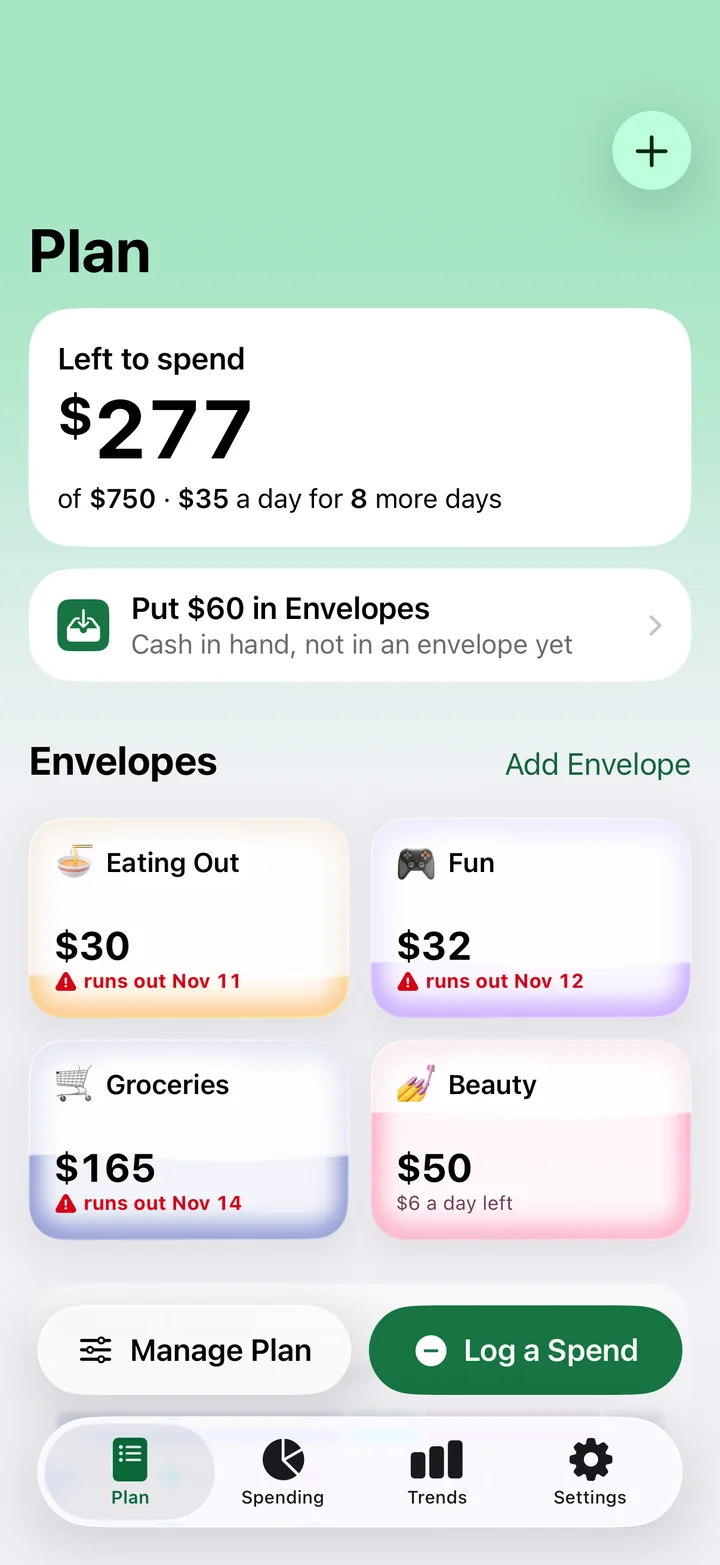
| Monthly budget app | Larder | |
|---|---|---|
| Plans | One month | One paycheck |
| Resets | On the 1st | On payday |
| Top number | Left this month | Left until payday |
| 3rd paycheck | Looks like extra | Gets its own plan |
What happens on payday
You tell Larder your pay and when you are paid, and the paycheck goes into envelopes: the bills that fall due before the next payday first, then the categories you spend from, then saving and debt. What is left after that is spending money, and it is the figure on the Plan tab.
Because the bills were set aside on payday, that figure is not a guess made from the balance in an account. Larder divides it by the days until the next payday, so “$277 left” also reads “$35 a day for 8 more days”.
What you see between paydays
Each envelope is a balance that goes down as you log purchases, and an envelope that will run dry before payday at the pace you are spending shows the date it hits zero. When you pay with Apple Pay and have set up the shortcut, the envelope’s balance shows on your Lock Screen. Trends sets this payday against the same stretch of the last one, so a category that is running high shows up while there is still time to do something about it.
If you ask whether a purchase fits, the coach in Trends answers from the same figures: what is free to use now, and the payday after which it would fit. The coach is part of Larder Pro.
How it differs from a monthly budget app
A monthly budget app asks you to plan a month and then watches the month. That works when pay and bills share a monthly rhythm. If you are paid every two weeks they do not, because rent is due on the 1st while payday walks around the calendar, and two months a year hold three paychecks.
A paycheck budget app makes the paycheck the unit. Each one gets its own plan, so a third paycheck in a month is a third plan and not a surprise in the monthly total. The method is written out in the guide on budgeting by paycheck, and the calculators on this site run the same arithmetic in a browser.
What it costs and what it runs on
Larder is free to use, and Larder Pro is a subscription for the extras, such as the coach. The App Store listing shows the current price. It runs on iPhone with iOS 26.0 or later.
Larder has no bank login. You enter spending by hand unless you turn on one of the optional ways to log it, which the page on budgeting without a bank connection goes through.
What is a paycheck budget app?
A paycheck budget app plans around each paycheck instead of the calendar month. On payday you divide that paycheck between the bills due before the next one and the envelopes you spend from, then track what is left until the next payday. Larder is one for iPhone.
Does Larder work if I’m paid every two weeks?
Yes. Every two weeks is one of the pay schedules you choose when you set up, with weekly, twice a month and monthly. Each paycheck gets its own plan, so a month with three paydays is three plans.
Do I have to connect my bank account?
No. Larder has no bank login and no bank-data service. You enter spending by hand, or turn on optional ways to log it: Apple Pay and bank-alert automations in Apple’s Shortcuts app, or Apple Card and Apple Cash purchases read on your iPhone through Apple’s FinanceKit.
Is Larder free?
Larder is free to use. Larder Pro is a subscription that adds features such as the coach, and the App Store listing shows the current price.
How is Larder different from a monthly budget app?
A monthly budget app plans one calendar month and starts over on the 1st. Larder plans one paycheck and starts over on your payday, and its top number is what is left until the next payday instead of what is left this month.
Which iPhones does Larder run on?
Any iPhone that can run iOS 26.0 or later.
Written by Larder, makers of an envelope budgeting app for iPhone. Last reviewed .